
Update, May 2, 2026
Versions 2.6.2 and 2.6.3 of the popular Python package lightning on PyPI should be attributed to the same campaign. If you have lightning==2.6.2 or lightning==2.6.3 in any environment, treat that machine as compromised and follow the same rotation steps below.
As fellow security nerds, we love falling down technical rabbit holes. We get excited digging through what others would write off as boring data, because we can already see the finding just beyond it, waiting to be uncovered. This is one of those rabbit holes.
On April 29, 2026, four official SAP-published packages on npm were caught running malicious preinstall scripts that exfiltrated developer and CI credentials. The packages have since been deprecated, but anyone who installed them before takedown should treat every credential reachable from those machines as compromised.
The technical breakdown by Aikido and Socket is excellent. This post is the practitioner companion. It walks through three things in order: what to check on your machines today, who actually got hit (which is a much smaller and more specific group than the headlines suggest), and what the attack looks like at the file-system layer if you want to hunt for it or write a rule.
The Affected Packages
Treat any environment that resolved one of these versions as compromised:
@cap-js/sqlite2.2.2@cap-js/postgres2.2.2@cap-js/db-service2.10.1mbt1.2.48
These are part of SAP's Cloud Application Programming Model (CAP) and Cloud MTA toolchain. If you do not work with SAP CAP, you are unlikely to have them as transitive dependencies. If you do, check now.
Check your lockfiles
The fastest way to confirm whether a bad version ever resolved in your repos:
$bad = @(
  '@cap-js/sqlite@2.2.2',
  '@cap-js/postgres@2.2.2',
  '@cap-js/db-service@2.10.1',
  'mbt@1.2.48'
)
Get-ChildItem -Recurse -File -Include package-lock.json,npm-shrinkwrap.json,yarn.lock,pnpm-lock.yaml |
  ForEach-Object {
    $hits = Select-String -Path $_.FullName -Pattern ($bad -join '|') -SimpleMatch
    if ($hits) {
      [pscustomobject]@{ File = $_.FullName; Hits = $hits.Count }
    } else {
      [pscustomobject]@{ File = $_.FullName; Hits = 0 }
    }
  } |
  Format-Table -AutoSize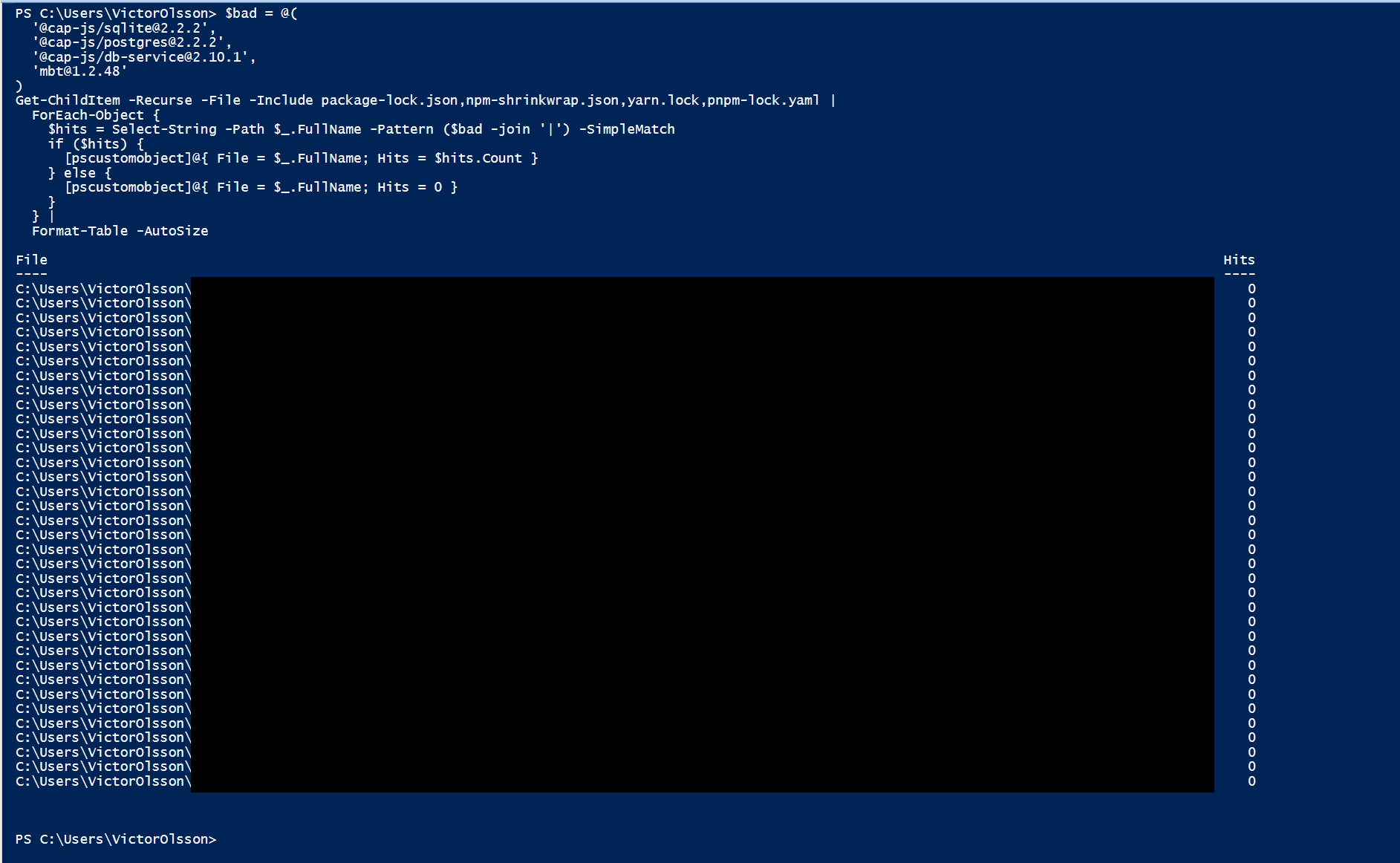
Hits column shows zero across the board.A clean run looks like this:
File                                                          Hits
----                                                          ----
C:\src\frontend\package-lock.json                                0
C:\src\backend\package-lock.json                                 0
C:\src\tools\pnpm-lock.yaml                                      0
A hit looks like this:
File                                                          Hits
----                                                          ----
C:\src\frontend\package-lock.json                                0
C:\src\sap-cap-service\package-lock.json                         3
C:\src\backend\package-lock.json                                 0
Any non-zero number in the Hits column for any lockfile means at least one of the bad versions resolved during install at some point. Treat the host or runner that produced that lockfile as compromised and follow the rotation steps below.
Run the same scan across your CI cache directories (~/.npm, ~/.pnpm-store, GitHub Actions cache mounts) and any container base images that did npm install in the affected window.
If you find a hit
Assume the host or runner reached the credential-sweep stage. Rotate every npm token, GitHub PAT, SSH key, AWS access key, Azure credential, GCP service account key, and CI secret that was reachable from that account. Do this before you analyse anything else. The malware also self-propagates by republishing other packages you control, so check your own published packages for new versions you did not author.
What the Malware Actually Does
The chain is short, deliberate, and mostly platform-agnostic. The preinstall hook in package.json kicks off a small loader (setup.mjs) that:
- Pulls the Bun JavaScript runtime down from GitHub releases for whatever OS it finds itself on.
- Hands control to a second-stage payload (
execution.js) which is layered with obfuscation and runs under Bun rather than Node, so anything tuned tonode.exenever sees it. - Sweeps a fixed list of credential paths and environment variables.
- On Linux CI runners, additionally reads
/proc/<pid>/mapsand/proc/<pid>/memof the GitHub ActionsRunner.Workerprocess to lift secrets straight out of memory, defeating the platform's log masking. - Encrypts the loot, creates a public repository on the victim's own GitHub account with the description "A Mini Shai-Hulud has Appeared", and pushes the data there.
- Uses GitHub's commit search as a dead drop, looking for commit messages with a known prefix to fetch follow-on tokens and propagation instructions.
Researchers attribute this with medium confidence to TeamPCP, the same operator linked to the Bitwarden CLI, Trivy, Checkmarx, and LiteLLM compromises. The reused code patterns across those incidents are what makes the link credible.
The dead drop is sitting in plain sight
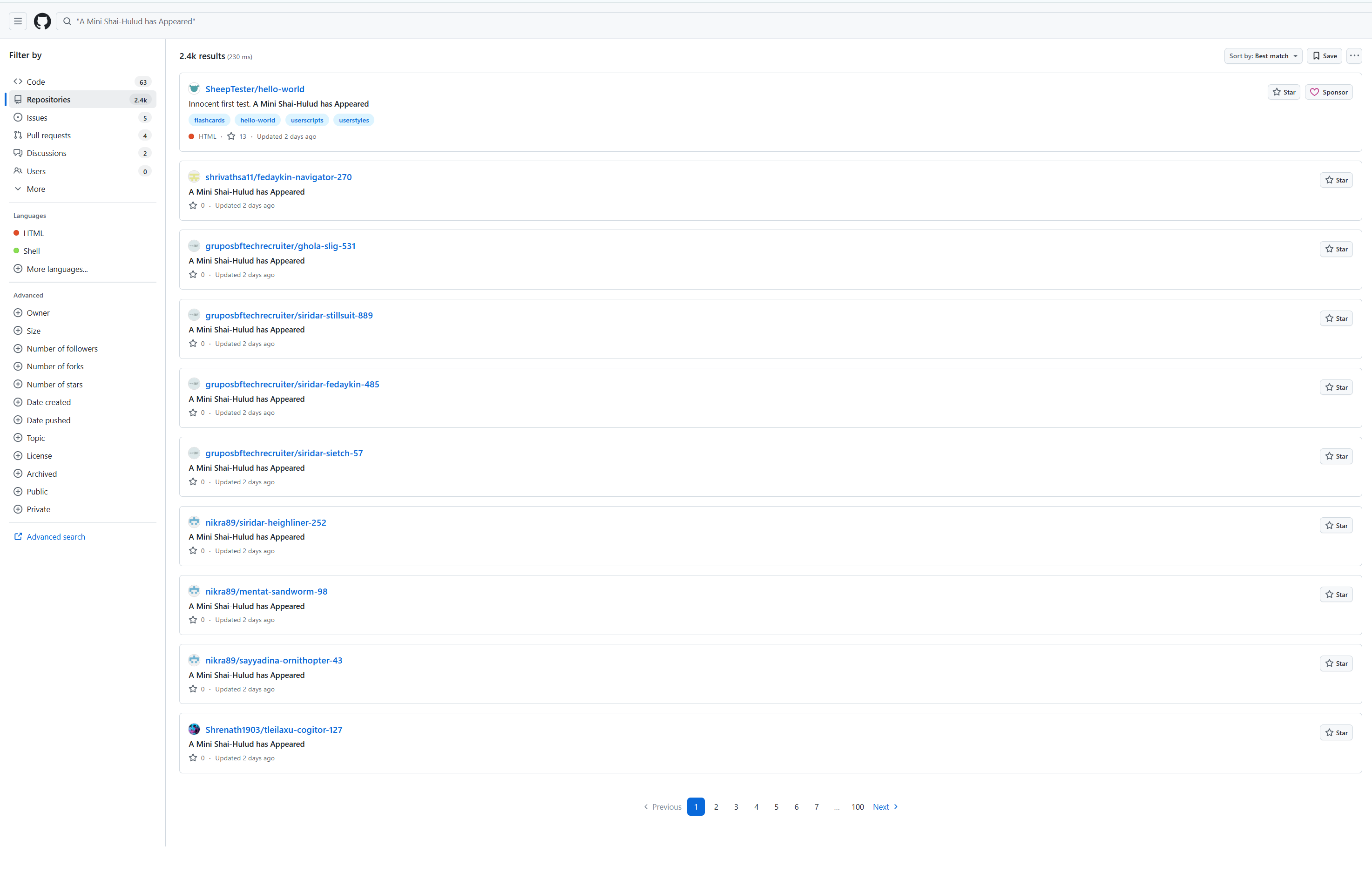
The exfiltration channel is not subtle. Every infected machine creates a fresh public repository on the victim's own GitHub account with the description "A Mini Shai-Hulud has Appeared", commits the encrypted loot as a single JSON file under results/, and pushes. A simple GitHub search for that description string returns the live victim list:
Drilling into a single victim's repository shows the structure: a README.md and a results/ directory containing one or more JSON files named results-<timestamp>-<n>.json.
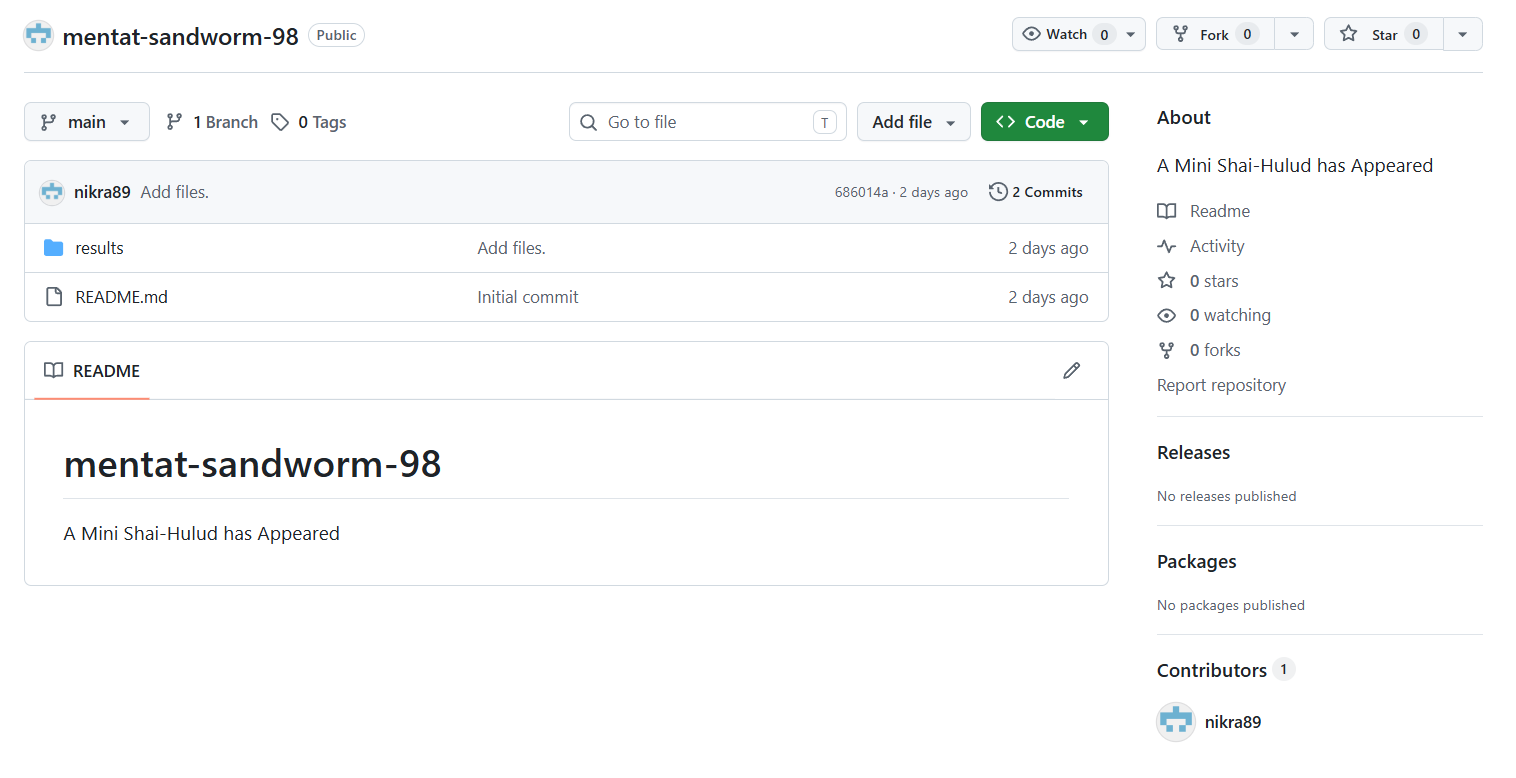
envelope) and the encryption key (key), both base64.The payload itself is two base64 blobs. The envelope is the encrypted credential dump and the key is the wrapped symmetric key the operator decrypts on their side:
{
  "envelope": "Q4YOjytGPAx7i4a7Deg2EqQl/4C2ZmO9MT5GoRD6G7nPPXhuQzynsgIUYVDkOn4w...",
  "key":      "ZmRoE8ZYZZykIMVDy4UhoeiA+1ApKwQNUKfOKCE49AHvVpA+ZT3AwYy3o+DR8CM..."
}
Check this on your own accounts now
Run this GitHub search and then re-run it scoped to each org and user account you own (add user:your-handle or org:your-org to the query). Any repository under your control with that description is a confirmed compromise of the credentials reachable from whichever machine or runner created it. Treat it as a breach notification from the attacker to you.
How Big Is the Victim Pool, Actually
The GitHub search above returns about 2,400 results at the time of writing. That is the easiest number to find, and it is the easiest one to misread as "2,400 compromised developers". It conflates three different things: the count of dead-drop repositories, the count of distinct credential dumps, and the count of distinct compromised humans. The three numbers are very far apart, and the gap matters for how you think about blast radius.
The next several sections walk through the steps from search-result count to defensible victim count. Each step shows the query, the result, and what the result rules in or out.
Scope of this analysis
Every number below is derived from public GitHub data scraped on May 1, 2026. It captures only what was visible at that moment: marker repos that still existed, on accounts that still existed, with at least one push the GitHub API would surface. Anything the attacker exfiltrated through a different channel, into a private repo, on a non-GitHub target, or on an account that has since been deleted or scrubbed, is invisible to this method. Treat the victim count as a lower bound on the public-GitHub footprint of the campaign, not as the total compromise.
Step 1: count the dead-drop repositories
The marker description "A Mini Shai-Hulud has Appeared" is the simplest way to enumerate drops. The Search API caps result-set size at 1,000 per query, so partition by created: date inside the campaign window:
$headers = @{
  Authorization = "Bearer $env:GITHUB_TOKEN"
  Accept        = 'application/vnd.github+json'
  'User-Agent'  = 'mini-shai-hulud-counter'
}

$drops = @{}
foreach ($day in 26..30) {
  $dateStr = "2026-04-{0:D2}" -f $day
  for ($page = 1; $page -le 10; $page++) {
    $q   = "`"A Mini Shai-Hulud has Appeared`" in:description created:$dateStr"
    $url = "https://api.github.com/search/repositories?q=$([uri]::EscapeDataString($q))&per_page=100&page=$page&sort=updated"
    $r   = Invoke-RestMethod -Uri $url -Headers $headers
    if (-not $r.items) { break }
    foreach ($it in $r.items) { $drops[$it.full_name] = $it }
    if ($r.items.Count -lt 100) { break }
    Start-Sleep -Milliseconds 500
  }
}
"drop_repos_in_window=$($drops.Count)"drop_repos_in_window=19691,969 repositories in the April 26-30 window. That is the actual IOC count behind the rounded "2,400" figure on the GitHub search page.
Step 2: confirm each drop has the malware's payload shape
The description string by itself is not proof. People repurpose phrases. A drop is only a real exfil if it contains results/results-<timestamp>-<n>.json with the two base64 fields envelope and key. Verify every one of the 1,969 repos:
$confirmed = 0; $empty = 0; $other = 0
foreach ($repo in $drops.Values) {
  try { $contents = Invoke-RestMethod -Uri "https://api.github.com/repos/$($repo.full_name)/contents" -Headers $headers }
  catch { $other++; continue }
  $resultsDir = $contents | Where-Object { $_.name -eq 'results' -and $_.type -eq 'dir' }
  if (-not $resultsDir) {
    $repoMeta = Invoke-RestMethod -Uri "https://api.github.com/repos/$($repo.full_name)" -Headers $headers
    if ($repoMeta.size -eq 0) { $empty++ } else { $other++ }
    continue
  }
  $inside   = Invoke-RestMethod -Uri "https://api.github.com/repos/$($repo.full_name)/contents/results" -Headers $headers
  $jsonFile = $inside | Where-Object { $_.name -like 'results-*.json' } | Select-Object -First 1
  if (-not $jsonFile) { $other++; continue }
  $obj = (Invoke-WebRequest -Uri $jsonFile.download_url -Headers $headers -UseBasicParsing).Content | ConvertFrom-Json
  if ($obj.envelope -and $obj.key) { $confirmed++ } else { $other++ }
  Start-Sleep -Milliseconds 200
}
"confirmed_payload=$confirmed"
"empty_repos=$empty"
"other=$other"
confirmed_payload=1078
empty_repos=889
other=2The full verification flips the easy assumption that a marker repo equals a successful exfil. The ratio is consistent with a script that creates the dead-drop repo first, then attempts to push, then either retries or moves on if the push fails. The two outliers (other=2) are repos with content but no results/ directory, almost certainly unrelated repurposings of the phrase.
The empty repos still tell us something. Creating a public repository on someone else's account requires a valid token for that account, so each empty marker repo is evidence that the malware reached the GitHub-token-theft step, even where the upload of the credential dump itself did not land. From here on, the analysis treats both buckets as malware activity and only excludes the two outliers.
Step 3: dedupe by repository owner
Group the 1,967 malware-created repos (1,078 confirmed exfils plus 889 empty placeholders) by the GitHub account that owns each one:
$dropsByOwner = $drops.Values | Group-Object { $_.owner.login } | Sort-Object Count -Descending
"distinct_owners=$($dropsByOwner.Count)"
$dropsByOwner | Select-Object -First 10 Count, Name | Format-Table -AutoSizedistinct_owners=42| Rank | GitHub account | Confirmed payload | Empty | Total |
|---|---|---|---|---|
| 1 | virinchy48 | 315 | 21 | 336 |
| 2 | nikra89 | 280 | 20 | 300 |
| 3 | tinin46 | 76 | 224 | 300 |
| 4 | daya0510 | 38 | 261 | 299 |
| 5 | shrivathsa11 | 143 | 7 | 150 |
| 6 | Shrenath1903 | 143 | 6 | 149 |
| 7 | LuisDepo | 21 | 130 | 151 |
| 8 | ckarmy | 6 | 96 | 102 |
| 9 | gruposbftechrecruiter | 46 | 2 | 48 |
| 10 | piaoxue855 | 4 | 26 | 30 |
1,966 marker repos belong to 41 distinct GitHub accounts. (The raw script output above reports 42 owners; one of those, copyleftdev, turns out in Step 4 to be a publicly maintained TeamPCP tracking dossier rather than a victim, and we exclude it from here on.) The top six accounts hold 1,534 of them, which is 78% of the total. One account, virinchy48, owns 336 on its own (315 of those have actual loot pushed).
That distribution does not match the intuitive reading of "~2,400 search hits = ~2,400 individual victims". Either a small number of accounts are aggregating drops from elsewhere, or the malware is looping on each victim's machine and producing a new marker repo on every run.
Step 4: confirm the inflation factor is the malware looping, not aggregation
To distinguish the two cases, look at who actually authored the commits inside each drop. GitHub records the author's login from the auth token used at push time, server-side, so it cannot be spoofed by setting a fake user.email in git config. If accounts like virinchy48 are aggregators, the commits on those drops should be authored by other people's tokens. If it is the malware looping under one victim's stolen token, the commits should all be authored by virinchy48.
$victimRepos = @{}; $i = 0
foreach ($repo in $drops.Values) {
  $i++; if ($i % 100 -eq 0) { Write-Host "  $i / $($drops.Count)" }
  $commits = Invoke-RestMethod -Uri "https://api.github.com/repos/$($repo.full_name)/commits?per_page=1" -Headers $headers
  $login = $commits[0].author.login
  if (-not $login) { continue }
  if (-not $victimRepos.ContainsKey($login)) { $victimRepos[$login] = @() }
  $victimRepos[$login] += $repo.full_name
}

$crossPosts = 0
foreach ($repo in $drops.Values) {
  $commits = Invoke-RestMethod -Uri "https://api.github.com/repos/$($repo.full_name)/commits?per_page=1" -Headers $headers
  if ($commits[0].author.login -and $commits[0].author.login -ne $repo.owner.login) { $crossPosts++ }
}
"cross_account_pushes=$crossPosts"
"distinct_authoring_logins=$($victimRepos.Keys.Count)"
cross_account_pushes=0
distinct_authoring_logins=42Zero cross-account pushes. Every drop is authored under the same login that owns the repository. So virinchy48's 336 marker repos were pushed by the virinchy48 account itself. That rules out aggregation. The remaining explanation is that the malware re-runs on the victim's machine on every npm install or CI build (or has a retry loop on push failure) and creates a fresh marker repository each time. The 45% empty-repo rate from Step 2 is consistent with that retry behaviour.
The raw inflation factor from the script output is 1,967 / 42, or roughly 47x. One of those 42 accounts, copyleftdev, turns out on inspection to be a publicly maintained TeamPCP tracking dossier (copyleftdev/mini-shai-hulud-dragnet) rather than a compromised account. Excluding it leaves 1,966 marker repos across 41 actual victims, an inflation factor of roughly 48x. The actual victim count, as far as public GitHub data can tell us, is 41.
Step 5: profile the 41 actual victims
Now the question becomes who those 41 accounts are. For each victim, pull the highest-starred non-marker repository they own (a rough proxy for downstream blast radius if the attacker were to republish it), the account creation date, and the count of confirmed-payload vs empty marker repos.
$rows = foreach ($login in $victimRepos.Keys) {
  $u = Invoke-RestMethod -Uri "https://api.github.com/users/$login" -Headers $headers
  $owned = @(); $page = 1
  while ($page -le 5) {
    $batch = Invoke-RestMethod -Uri "https://api.github.com/users/$login/repos?per_page=100&type=owner&page=$page" -Headers $headers
    if (-not $batch -or $batch.Count -eq 0) { break }
    $owned += $batch
    if ($batch.Count -lt 100) { break }
    $page++
  }
  $nonMarker  = $owned | Where-Object { $_.description -notlike '*Mini Shai-Hulud*' -and -not $_.fork }
  $topRepoObj = $nonMarker | Sort-Object stargazers_count -Descending | Select-Object -First 1
  [pscustomobject]@{
    Victim         = $login
    DisplayName    = $u.name
    DropRepos      = $victimRepos[$login].Count
    NonMarkerRepos = $nonMarker.Count
    TopRepo        = $topRepoObj.full_name
    TopStars       = [int]$topRepoObj.stargazers_count
    AcctCreated    = ($u.created_at -split 'T')[0]
  }
}
$rows | Sort-Object TopStars -Descending | Format-Table -AutoSize| Victim | Confirmed | Empty | Top stars |
|---|---|---|---|
virinchy48 | 315 | 21 | 0 |
nikra89 | 280 | 20 | 0 |
shrivathsa11 | 143 | 7 | 0 |
Shrenath1903 | 143 | 6 | 0 |
tinin46 | 76 | 224 | 1 |
gruposbftechrecruiter | 46 | 2 | 0 |
daya0510 | 38 | 261 | 0 |
LuisDepo | 21 | 130 | 0 |
ckarmy | 6 | 96 | 0 |
piaoxue855 | 4 | 26 | 0 |
AfonsoFigueiredo-AMT | 4 | 16 | 0 |
| 13 victims with confirmed loot above. 28 victims below have only empty marker repos (loot pushes did not land). | |||
WannaFIy | 0 | 1 | 75 |
feddernico | 0 | 2 | 10 |
Nicoldeep | 0 | 1 | 2 |
Pie-Loup | 0 | 4 | 2 |
PFrisonCTAC | 0 | 4 | 2 |
| 23 more accounts with empty marker repos and zero stars on any non-drop repo. Omitted from the table because none of them changes the conclusion: no high-reach maintainer is in the victim pool. | |||
The reach distribution is much smaller than the headline number suggests. The highest-starred account in the victim set, WannaFIy/mask_AD at 75 stars, is also one of the accounts where the malware did not successfully push loot. It has a single empty marker repo and nothing else, so the most we can say is that someone authenticated as that account created a placeholder. After WannaFIy the distribution drops to 10 stars, then a long tail. There is no high-profile package maintainer on this list. If you were worried about a mass downstream npm-republish wave from this incident, the data does not support that worry. Nobody here maintains a package that anyone depends on at scale.
Who actually got hit
The 41 victims cluster tightly around the SAP CAP ecosystem, which fits the attack surface (@cap-js/sqlite, @cap-js/postgres, @cap-js/db-service, mbt). Repository slugs carry the same signal: onlybimal17/SAP_FIORI_CAP, daya0510/vendorcapmproject (CAPM is the SAP Cloud Application Programming Model), GokulPrasath22/Frontend-crud-operations-SAP-BAS, nikra89/risk-management. Mostly individual contributors and learners, with a few accounts whose handles or commit-email domains suggest working consultants, the kind of accounts likely to have credentials for client tenants cached on the same workstation as a personal npm install.
We are intentionally not naming the suspected employers. We have no evidence that any specific corporate tenant was accessed, only that a developer's GitHub account had marker repos pushed under it. Organisations that suspect involvement are welcome to contact us privately.
Perceived impact vs actual impact
If you saw the GitHub search count and read it as "2,400 compromised developers", you probably overestimated the blast radius and underestimated the targeting. The corrected version of the story is:
- 1,969 marker repositories in the campaign window. 1,078 contain confirmed encrypted loot; 889 are empty placeholders the malware created via stolen GitHub tokens but did not finish pushing to; 2 are unrelated.
- ~41 distinct compromised GitHub accounts, with a roughly 48x average inflation factor from the malware looping per execution. Of those 41, 13 have confirmed loot pushes; the other 28 only have empty placeholder repos but still imply the GitHub token itself was stolen.
- Zero high-reach maintainers on the victim list. The two accounts with any meaningful star count (75 and 10) are also the ones where the malware did not successfully push, and neither maintains anything widely depended on. The downstream npm-republish risk from this specific incident is effectively bounded.
- Targeted population is the SAP CAP developer ecosystem, including at least a handful of accounts whose handles or commit metadata suggest employment at SAP services firms. The meaningful follow-up risk is lateral movement into client SAP tenants via cached BTP, S/4HANA, or HANA Cloud credentials on those consultants' workstations, even where no high-reach npm package is involved.
The File-System Fingerprint
So far the post has covered who got hit and how to confirm whether you are one of them. The rest is about what the attack looks like to a data-centric solution, which is the most reliable place to catch the next variant.
Downloading Bun is a deliberate evasion. Most controls that hook Node (process integrity tools, runtime monitoring extensions, internal allow-lists for node.exe) do not hook Bun. From the operating system's point of view a brand new binary appears in a temp directory and starts reading credential files. That is a very loud event if you are watching file activity. It is a quiet event if you are only watching Node.
Aikido's analysis lists a wide set of targets, including live calls to gh auth token, AWS STS, Secrets Manager, SSM, Azure Key Vault, GCP Secret Manager, and Kubernetes service account tokens. Those API calls do not produce a meaningful file-system event, so a data-centric solution will not see them directly. What it will see, and what is the most reliable signal you can build a detection on, is the file-read half of the same sweep. The list below is the subset of targets that touch disk on a typical developer or runner machine. It is not exhaustive, and any successor variant will likely add to it.
Cross-platform credential paths
~/.npmrcand%USERPROFILE%\.npmrc(npm tokens)~/.aws/credentials,~/.aws/config,~/.aws/sso/cache/~/.azure/(entire directory, especiallyaccessTokens.json,azureProfile.json, and the MSAL token cache files)~/.config/gcloud/(especiallyapplication_default_credentials.json,credentials.db, andaccess_tokens.db)~/.kube/configand, on Linux pods or runners,/var/run/secrets/kubernetes.io/serviceaccount/token~/.ssh/id_rsa,id_ed25519,id_ecdsa, and any*.pemin that directory~/.git-credentialsand~/.gitconfig~/.docker/config.json.env,.env.local,.env.productionanywhere in the workspace- Local config for AI tooling (
~/.config/claude/, MCP server configs) and any wallet files (Electrum, browser wallet extensions) the operator's payload reaches for opportunistically
Windows-specific extras
On a Windows developer box the same payload sits next to high-value Windows stores. It is reasonable to assume any successor variant will also touch:
%APPDATA%\Microsoft\Credentials\(Windows Credential Manager blobs)%APPDATA%\Microsoft\Protect\(DPAPI master keys)%APPDATA%\Roaming\Microsoft\Crypto\(RSA key containers)%LOCALAPPDATA%\Google\Chrome\User Data\Default\Login Dataand the equivalent Edge / Brave / Opera files%APPDATA%\Mozilla\Firefox\Profiles\*\logins.jsonandkey4.db
Linux CI extras
On a hosted Linux runner the giveaway is any process opening /proc/<pid>/maps or /proc/<pid>/mem for a PID it did not spawn. Legitimate processes almost never do this. The runner's own worker (Runner.Worker for GitHub Actions, similar for GitLab) is the specific target.
A Detection Pattern That Does Not Need Signatures
You can write the detection in a tool-neutral way. The shape of the behaviour is:
A child process of
npm,pnpm,yarn, ornode, where the child is notnodeitself, that within sixty seconds of launch reads three or more files from the credential path list above.
That single sentence catches this incident, the Bitwarden CLI incident, the LiteLLM incident, and most plausible variants. It does not depend on hashes, domains, or the specific runtime the attacker chose. It depends on the fact that npm install has no legitimate reason to read your AWS credentials.
For ZeroExfil users, we have published a matching rule that fires on the kernel-level read events: rule-supply-chain-npm-preinstall-credential-sweep-001. The same logic is straightforward to express in EDR query languages such as KQL, osquery, or Falco. The point is not the syntax. It is that you are watching reads, not just writes and process launches.
What to Do Now
For this specific incident the coverage is small: 41 confirmed accounts, no high-reach maintainers, no widely depended-on packages republished. For most readers there is nothing to clean up, only something to check.
- Run the lockfile scan above across every repo, every CI cache, and every container image built in the affected window. If it comes back clean, you are done.
- If you find a hit, rotate everything reachable from that host or runner, check your published packages for versions you did not author, and run the GitHub search above scoped to every account and org you own.
The broader hardening (registry proxy with quarantine, ignore-scripts=true where viable, OIDC over long-lived PATs, kernel.yama.ptrace_scope=2 on self-hosted runners) is worth doing because the pattern keeps recurring, not because of this campaign in isolation. Five TeamPCP campaigns in roughly a year is enough evidence that the playbook works. The defensive posture worth investing in is one where a stolen package cannot reach a credential without producing a visible event, and where the event is captured by something other than the runtime being attacked. The same argument I made in the AI coding agent post: the chat UI shows what the tool reported, the kernel shows what actually happened. A preinstall script can lie about what it does. The file system cannot.
What This Series Keeps Coming Back To
Three posts in, a pattern is forming. AI agents read files in your user context. Defender misses entire categories of file activity. A trojanised npm package reads your AWS credentials in the time it takes to install. The single thread is that user-context reads are where the damage happens, and reads are the event most monitoring stacks underweight relative to writes.
If you want the short version: watch reads from non-Microsoft, non-developer-toolchain processes against the credential paths above, and you will catch most of what TeamPCP and its imitators do for the foreseeable future. The rest is rotation, lockfiles, and not running install scripts you do not need.
Sources
- BleepingComputer: Official SAP npm packages compromised to steal credentials (April 29, 2026). News reporting on the incident, the affected versions, and attribution context.
- Aikido: Mini Shai-Hulud has Appeared. Technical breakdown of the preinstall loader, Bun-based execution, and the GitHub repo dead-drop pattern.
- Socket: SAP CAP npm packages supply chain attack. Independent analysis including the
/proc/<pid>/memRunner.Worker memory scraping that bypasses GitHub Actions log masking. - BleepingComputer: Bitwarden CLI npm package compromised to steal developer credentials. Earlier TeamPCP campaign with very similar code structure.
- BleepingComputer: Popular LiteLLM PyPI package compromised in TeamPCP supply-chain attack. Cross-ecosystem variant of the same operator's playbook.
- BleepingComputer: Trivy vulnerability scanner breach pushed infostealer via GitHub Actions. Origin of the CI memory-scraping technique reused here.
- Live victim list (GitHub search): repositories matching the dead-drop description.